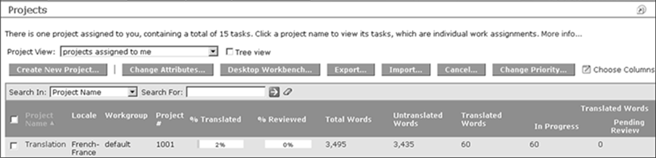
WorldServer tracks translatable word counts and percentage completion of translation work in projects and tasks. These metrics are available and regularly updated for every task going through the system.
- % Translated
- % Reviewed
- Total Words
- Untranslated Words
- Translated Words
- Translated Word Details (In Progress, Pending Review, Reviewed)
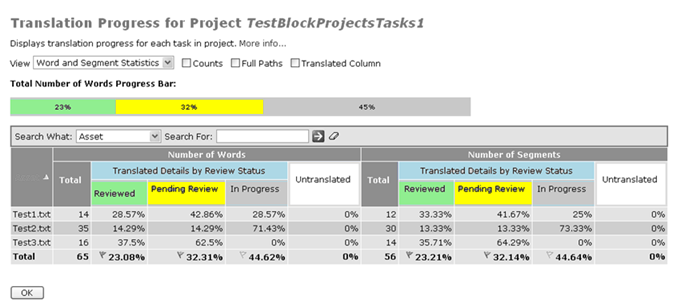
Reviewed,
Pending Review, or
In Progress) for translated words or segments.
Reviewed and
Pending Review numbers derive from the number of segments with
Finished and
Pending segment review status, respectively, in the WorldServer Browser Workbench. The
In Progress number derives from the sum of
No Status and
Rejected segment review statuses.
The color-coded progress bar shows the percentages of reviewed, pending review, in-progress, and untranslated words or segments. You can choose to also show word and segment counts, full asset paths, and the total amount of translated words or segments (which is a sum of reviewed, pending review, and in-progress).
To view the progress of individual tasks in a project, go to the page, and click the % Translated, % Reviewed or a word value for the task. The following pop-up displays:
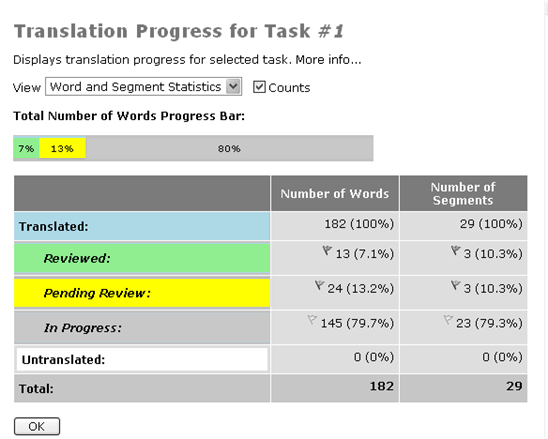
This
Translation Progress for Task #N screen displays, with a color-coded progress bar showing the percentages of reviewed, pending review, in-progress, and untranslated words or segments for this task. You can show the word and segment counts by checking the
Counts checkbox. Next to the
Reviewed,
Pending Review, and
In Progress number is the segment review status icon for that segment.