You can perform a search for TM entries by selecting a TM and then clicking the
Search button.
Procedure
-
In
, select the translation memory in which to search.
-
Select a search mode.
- Standard. This exhaustive search finds all matches in the translation memory that exactly contain the search text (ignoring whitespaces). It supports searches for words, partial words (using wildcards), numbers, and non-alphanumeric characters. Note that searches using this mode may not return every occurrence in the translation memory of the specified search term, because the
Maximum Number of Hits value limits the number of entries returned.
- Segment Leverage. This search mode (which is similar to what in releases previous to WorldServer 9.0 was called Fuzzy Search mode) shingles the search text to look for matching terms. If the search text is
fox in socks on Knox on box, potential terms that can match include
fox in socks,
socks on Knox and
socks on Knox on box. This search mode only supports searches for whole words. It takes advantage of stemming, if set up, and returns results equivalent to doing a translation memory lookup from a segment in the Browser Workbench. Segment Leverage searches are only guaranteed to find matches if enough context is supplied (typically 3 words). For example, searching for a single word only finds matches in short segments but does not exhaustively find matches, because not enough word context was provided.
Wildcard search ("*") only works in
Standard search. It does not work in
Segment Leverage search.
- Concordance. The concordance search tool lets you search translation memory and, optionally, machine translation for a word or phrase that you are unsure about, to give you examples of how the word or phrase has been used elsewhere. For example, if you had to translate a industry-specific term like "photovoltaic adapter" or "hedge fund," you might search both translation memory and machine translation for matches.
The standard and segment leverage translation memory search options are focused on finding exact and fuzzy matches, for the purpose of providing a translation for a complete segment. The concordance search is a secondary type search that attempts to find TM entries where the words provided have been used.
See the "Concordance Search" topic for particulars.
- Freeform SQL. This mode, which is available from the
Advanced link, enables you to author complex SQL-based queries against the translation memory. It supports the use of wildcard searches and complex groupings. In short, it supports all filtering clauses supported by the underlying database.
-
If you chose the
Standard,
Segment Leverage, or
Concordance search mode, specify the following:
-
Type the text into the
Search For field.
Tip: Use
Standard search mode to look for exact word matches or wildcard matches using the
* character. Use
Segment Leverage and
Concordance search mode to find related matches. Note that * is interpreted as a wildcard character only in
Standard search mode.
-
Select whether to search in the source or target.
-
Select the source and target languages to refine your search. If you do not select source and target languages, all languages will be returned.
-
Specify the maximum number of hits you want returned. Note that specifying this value too low may result in the search not returning translation memory entries that contain the search value. If the search does not return an entry that you expect to find in the translation memory, increase this value and repeat the search.
Note: The maximum number of hits corresponds to each target language and not to the overall translation memory. That is, if you specify 10 for the maximum number of hits, and search over 5 locales, a total of 50 hits might be returned: 10 for each locale.
-
Either accept the default of
0%, or specify a minimum score which a match must have to be included in the result set.
-
Specify the TM entry
Status on which to filter. In the normal TM mode, you can select
All (the default),
Locked, or
Unlocked.
When you lock an entry, it is moved to the bottom of the search result set and a

icon is placed next to it:
Figure 1. Locked TM Entries
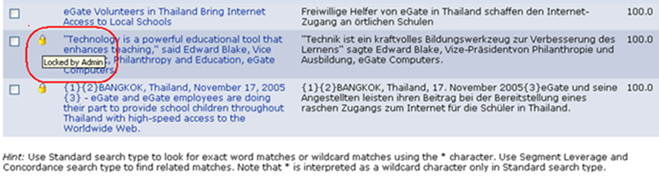
A tooltip tells who locked the entry.
If you are in "Live" TM mode, you also can select
Pending Review,
Reviewed, or
Rejected status. See the topic on "Live Translation Memory Mode" for a description of these statuses.
-
Optionally click the
Advanced link to search with attribute filters. For information about using and creating translation memory attribute filters, see
Advanced TM and TD Search.
-
Click the Search button (
 ) to perform the search.
-
If you chose the
Freeform SQL search mode, type your query (see rules and samples below) and click the Search button () to perform the search.
Freeform SQL queries have the following rules:
- Apart from the variable column names and date notation used, everything you type must be in raw SQL format. For example, you must type the character
"
%" to denote wildcard and the comparison operator
"like" to perform containment or substring search.
- To search for single quote character, use double quote.
- To search for single backslash character, use double backslash.
- To search for the SQL wildcard characters
"
%" and
"_", escape them using a backslash.
- Enclose dates in braces
{} using the date format specified in the
strings.properties file. For example,
MM/dd/yy hh:mm AM (or PM).
Note: Freeform SQL search executes a query using the SQL syntax supported by the database. The syntax differs between databases. Consult the SQL manual for your database for information on proper syntax.
Below are some sample queries for Freeform SQL mode:
-
Show me all translation memory entries whose source content contain
"
nuts bolts rotat"
[Source] like ‘%nuts bolts rotat%’
-
Show me all translation memory entries whose source content contain
"
nuts"
-
Show me all translation memory entries whose source content contain
"
nuts" OR
"bolts"
[Source] like ‘%nuts%’ or [Source] like ‘%bolts%’
-
Show me all translation memory entries whose target content contain
"
nuts" AND
"bolts"
[Target] like ‘%nuts%’ and [Target] like ‘%bolts%’
-
Show me all translation memory entries whose target content contain
"
nuts*bolts*rotat" (Order of words is implied; not the same as
"nuts" AND
"bolts" AND
"rotat".)
[Target] like ‘%nuts%bolts%rotat%’
-
Show me all translation memory entries whose target content contain
"
(nuts" OR
"bolts)" AND
"(rotat)".
([Target] like ‘%nuts%’ or [Target] like ‘%bolts%’) and [Target] like ‘%rotat%’
-
For SQL Server databases only, search for text containing non-ASCII (Unicode) characters. You must insert an
N before a string containing Unicode characters.
[Source] like N'%search string%'
Miscellaneous Examples
[Source] like '[^A-Z]%oracle[^A-Z]%corporation'
([Source] like '%' or [Target] like '%') and [Created By] = 'Admin' and [Modified By] = 'Admin' and [SID]   is null and [Source] is not null
([Source] like '%oracle%' or [Source] like '%ebay%' or [Source] like '%Mold Layout%') and ([Target] like '%oracle%' or [Target] like '%ebay%' or [Target] like '%Mold Layout%')
[Source] like '%'
-- search for wildcard characters % and _
[Source] like '%\%%' and [Source] like '%\_%'
-- search for 4 single '
[Source] like '%''''''''%'
-- search for single \
[Source] like '%\\%'
[Source] like '%' order by [Source]
[Source] like '%' order by [Source] desc
[Source] like '%' order by [Modified On]
[Source] like '%' order by [Modified On] asc
[Source] like '%' order by [Modified On] desc
[Source] like '%' order by [Source], [Target]
[Source] like '%' order by [Source], [Target], [Created By], [Modified By], [Created On], [Modified On]
[Source] like '%' order by [Source] desc, [Target] desc, [Created By], [Modified By], [Created On] desc, [Modified On] desc
[Source] like 'eBay : Crafts Seller Guide : Advanced Strategies'
[Source] = 'eBay : Crafts Seller Guide : Advanced Strategies'
[Source] like 'What works for one company may not work for another. ' or [Source] like 'eBay : Crafts Seller Guide : Advanced Strategies' or [Source] like 'Therefore, you should not use this as a formula for success. '
[Source] in ('What works for one company may not work for another. ', 'eBay : Crafts Seller Guide : Advanced Strategies', 'Therefore, you should not use this as a formula for success. ')
[Created By] = 'Admin' and ([Created On] between  {01/22/04 11:15 AM} and {01/22/04 11:16 AM})
[Created By] = 'Admin' and [Modified On] > = {01/22/04 11:15 AM}
[Created By] = 'Admin' and [Modified On] < {01/22/04 11:15 AM}
[Created On] between  {01/20/04 11:15 AM} and {01/22/04 11:16 AM} order by [Created On]
[Created On] between  {01/20/04 11:15 AM} and {01/22/04 11:16 AM} order by [Source], [Target], [Created By], [Modified By], [Created On], [Modified On]