The phase of the workflow is a
grouping of workflow steps that collectively execute a particular
well-known purpose. For example, you might have groupings for Translation, Review, DTP, QA, and so on.
Workflow phases enable you to more easily track task workflow and project progress by replacing obscure workflow step names with user-friendly workflow phases that they understand well. This is used in WorldServer for monitoring task progress.
To create a workflow phase, simply go to , click Add, and supply a name and description, then click Save.
Human and automatic actions have a Workflow Phase attribute
among the Advanced options, with which you can associate the step with a workflow
phase. You can use the Workflow Editor to associate any human or automatic
steps in the workflow with a particular workflow phase.
In the Task List screen (), you can view the phase of each task in the project. You can also select a phase and view only the tasks in that phase.
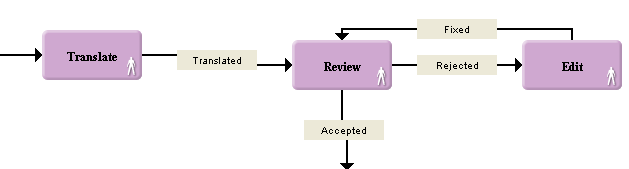
In this workflow, the translated task goes into review and then corrections
are done in the Edit step. The task loops inside the Review/Edit cycle until the review
is completed. From an external user’s perspective both the Review and Edit steps are part
of one phase—the "Review" phase. To achieve that result, both steps
would have the same workflow phase, for example, Translation Review. This
string is used to convey the state of the task to an outside user
without exposing all the workflow details, and is assigned to both
steps in the Advanced dialog in the Workflow Editor:
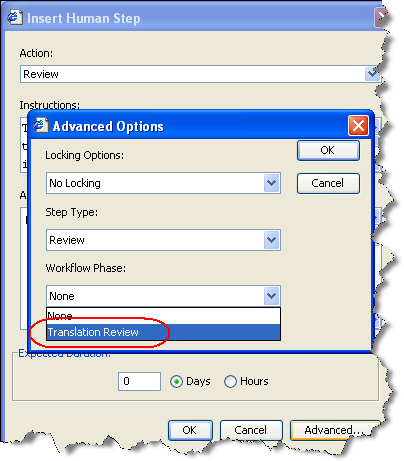
The string "Translation Review" that appears here as a workflow phase was configured on the page.