The segment statuses—Pending Review, Reviewed, Rejected, or No Status—are intended to indicate the state of the segment and, more importantly, who currently has responsibility for the segment. For example, if a segment is marked as Pending Review, then a reviewer is supposed to “own” the segment. If segment is marked as Rejected, a translator should own the segment. If a segment is marked as Reviewed, the segment is ready to move on through the workflow.
The Step Type option, which is available for all Human Steps in a workflow on
the Advanced options pop-up, indicates what type of work (Review or Translate) is performed during
the step and can control behavior in the Browser Workbench. You would
not want the translator to be able to mark segments as having Reviewed status; only
reviewers should be able to do that. You can restrict the translator
by setting the Step
Type parameter in the Translate human action
to Translate. That
way, when a translator claims a task during the Translate step, and
opens the asset in the Browser Workbench, the menu will contain only Pending Review and None, instead of all of the
statuses. For details on how the Step Type is treated by WorldServer,
see Rules for Step Type Option.
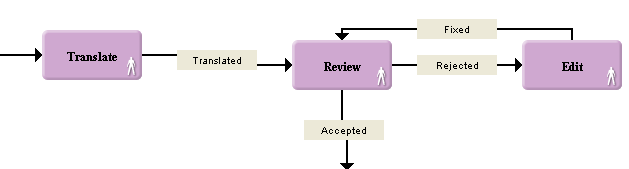
In this workflow, the translated task goes into review and then corrections
are done in the Edit step. The task loops inside the Review/Edit cycle until the review
is completed. To facilitate review rules, the Review step can be
defined as Review step type while the Edit step will be defined as Translate step type. That
way, the reviewer will be able to set segments to Reviewed (so they are
considered finished) or Rejected (so they will go to the Edit step to be corrected).
The "editor" (who is operating with the Translate step type) will
only be able to correct the rejected segments and set them to Pending Review.